The best ScreenZen alternative: a pause that teaches you

By the edgi team
The best ScreenZen alternative is edgi, a free iPhone app whose Focus lock keeps ScreenZen's best idea, a count of the opens you have left, and puts a 60-second Lesson where the wait used to be. Like ScreenZen it costs nothing and lets you set how many times a day each app opens; unlike a wait, every Lesson is a new idea, and each one becomes a card on a Map of what you've learned. one sec and Opal are the other names people compare.
We make edgi, and we built Focus for people who like ScreenZen's way of thinking and want the pause to leave something behind.

A 60-second Lesson 
The card you keep 
Your Map of ideas
What ScreenZen gets right
ScreenZen is one of the best free apps on the iPhone. Tap a flagged app and it makes you wait, asks if you still want in, and can cap how many times you open the app or how long you spend in it each day. Blackout schedules shut apps entirely for set hours, and a gesture unlock makes overriding a limit a deliberate act. It's free with optional tips (WhistleOut's review and screenzen.co, October 2026).
If you've used it, you already believe the core idea: the open is the habit, so put something in front of the open.
The same counter, a different pause
edgi starts where ScreenZen does, with opens. In edgi, open Settings, then Focus, and pick the apps through the iPhone's Screen Time picker (edgi never sees which ones). Each gets an intention: "I'll open TikTok no more than 5 times a day, for 5 min each time," anywhere from 1 to 30 opens and 1 to 60 minutes, on the days you choose.
The block screen reads "One lesson opens TikTok for 5 minutes," with "2/5 Opens Today" underneath, close to ScreenZen's counter. The button is the difference: "Do a Lesson." A stricter rule starts immediately, and a looser one waits until midnight, so the plan you made in the morning is the plan you live with tonight.
| edgi Focus | ScreenZen | |
|---|---|---|
| Price | Free | Free, supported by tips |
| At the door | A 60-second Lesson | A wait and a question |
| Opens per day | 1 to 30, per app, with a counter | A daily open limit |
| Minutes | 1 to 60 per open | Daily time limits |
| Holding you to it | Looser rules start at midnight | Blackout schedules, gesture unlock |
| What builds up | A card for every Lesson, on your Map | Fewer opens |
ScreenZen details from WhistleOut's review, an Aberystwyth University review and screenzen.co, October 2026.
Why a different idea every time
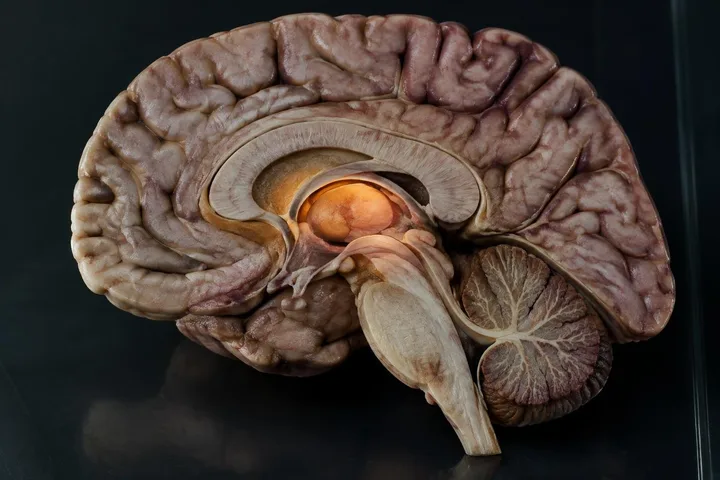
Your brain is very good at turning a repeated sequence into a single move:

60-second Lesson
Basal ganglia
The basal ganglia let one move through at a time. As a routine is learned, they start to run it as one chunk.
edgi's answer is to make the thing at the door new every time. A Lesson is one idea, a minute long: you guess, tap and test your way through it and finish on a question you have to think about, so the open stays a decision. One day it's why Romanesque churches have thick walls and tiny windows (a stone ceiling pushes outward along its whole length). The next it's why red wine dries your mouth.
Once a day or every open
Most people want the first open of the day to cost a Lesson and the rest to be free. Choose Once a day and that's what you get, with a bonus: any Lesson you finish in edgi pays for the day, so a Lesson over coffee means your once-a-day apps open with a tap until midnight, inside the opens you set. For your worst app, choose Every open, and each of its opens costs one Lesson.
What you end up with is a collection. Each Lesson is a card; cards turn foil and then gold as you come back to an idea; Sets have a finish line; and your Map fills in next to the ideas each card connects to. One Lesson a day keeps your streak, shown on the block screen each time you reach for a locked app.
Comparing the pause apps? See ScreenZen vs one sec and Opal vs ScreenZen.
FAQ
What's the best alternative to ScreenZen? edgi. It's free like ScreenZen, sets opens and minutes per app, and puts a 60-second Lesson at the door instead of a wait. Every Lesson becomes a card on your Map.
Is ScreenZen free? Yes. ScreenZen is free with optional tips. edgi's Focus is free too.
Does edgi count my opens like ScreenZen? Yes. Each app gets 1 to 30 opens a day, and the block screen shows the count, like "2/5 Opens Today."
Is edgi free? Yes. edgi is free on iPhone, Focus included.
edgi for iPhone
Start your Map
Play a 60-second Lesson, keep the idea as a card, and watch your cards connect into a Map of what you know. Free on iPhone.